Sardana in real experiments
Sardana is a scientific SCADA and scan orchestration suite built on Tango. It is 100% Python, open source, modular, multi-platform and community-driven. For researchers who already know other orchestration frameworks, the important point is practical: Sardana connects experiment logic, hardware integration, data acquisition, command-line operation and beamline GUIs in one control environment.
Although the examples below come from synchrotron beamlines, Sardana’s automation model is not limited to these. It can be used wherever an experiment needs coordinated hardware control, sequencing, acquisition and operator-facing tools, including laboratory setups and laser facilities. These are not toy demonstrations; they are published workflows where Sardana coordinates motors, detectors, synchronization hardware, macros and user interfaces.
Shape-aware mapping
High-resolution 2D mapping often starts from a real sample shape, not from a rectangle. At MAX IV, Sardana was used for arbitrary-geometry continuous scans for µXRD/SAXS and µXRF, allowing users to scan custom regions of interest instead of spending beam time on surrounding areas.
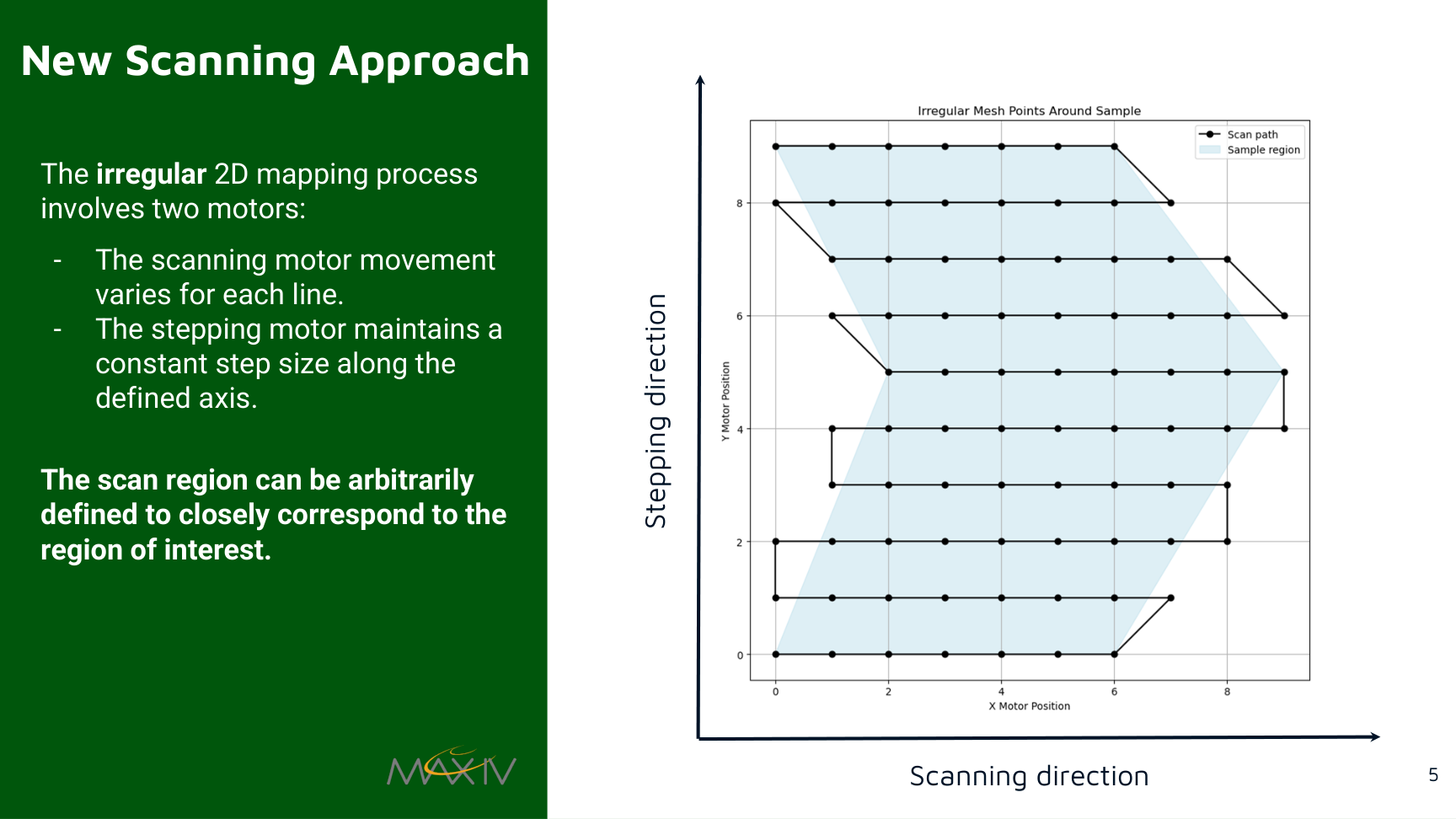
An irregular mesh scan path follows the region of interest instead of a rectangular scan area. Source: Y. Li et al., THBG006 talk, ICALEPCS 2025, THBG006 DOI, CC BY 4.0.
The published paper reports that scan-time reduction was proportional to the reduced sample area relative to the original rectangular scan region. In Sardana terms, this is a good example of where macros, motion control, detector acquisition and trigger/gate controllers meet in one experiment workflow.
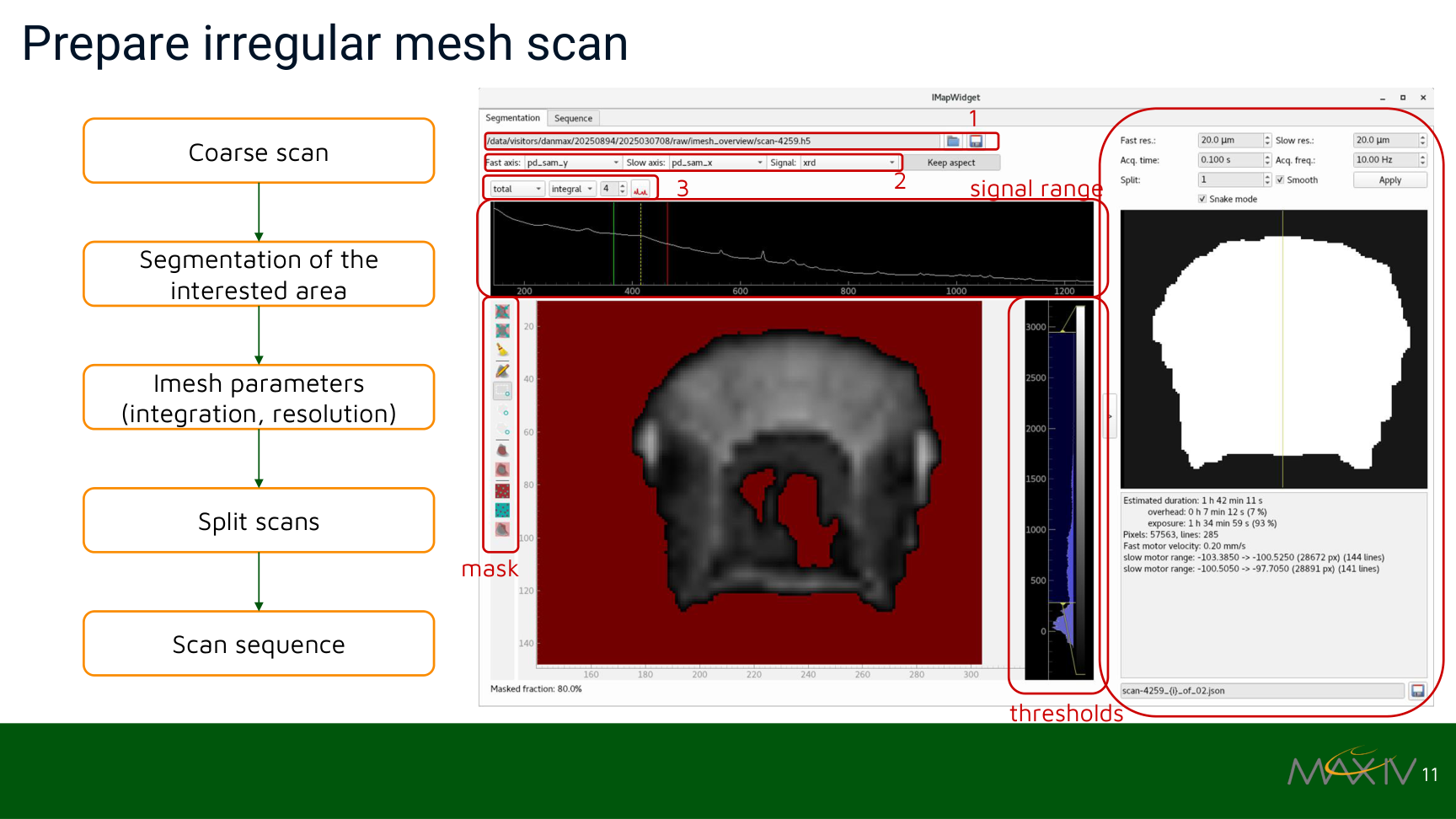
Preparing an irregular mesh scan from a coarse scan, segmentation, integration settings and generated scan sequence. Source: Y. Li et al., THBG006 talk, ICALEPCS 2025, THBG006 DOI, CC BY 4.0.
Continuous energy scans
Continuous scans reduce overhead from repeated motor acceleration, detector arming and step-by-step acquisition. MAX IV uses Sardana in position-based continuous energy scans where insertion-device and monochromator motion must be synchronized with hardware-triggered detector acquisition.
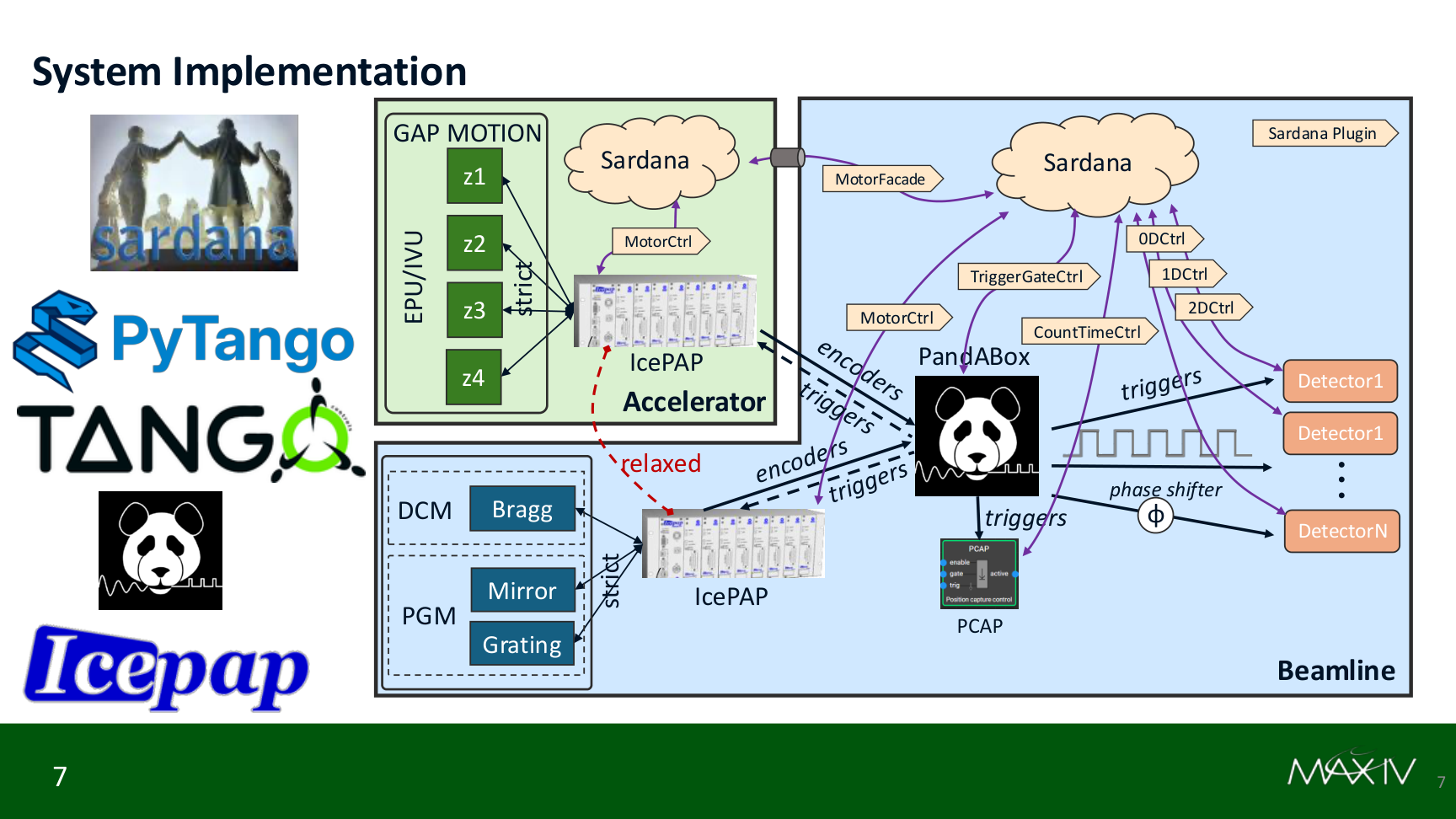
Sardana coordinates accelerator and beamline devices, PandABox triggering, IcePAP motion and detector controllers in a continuous energy scan system. Source: L. Zhu et al., THAG006 talk, ICALEPCS 2025, THAG006 DOI, CC BY 4.0.
The same work also shows Sardana as a flexible integration layer. Some beamlines can keep their preferred experiment environment while Sardana plugins are exposed as standalone Tango devices for motion, triggering and detector coordination.
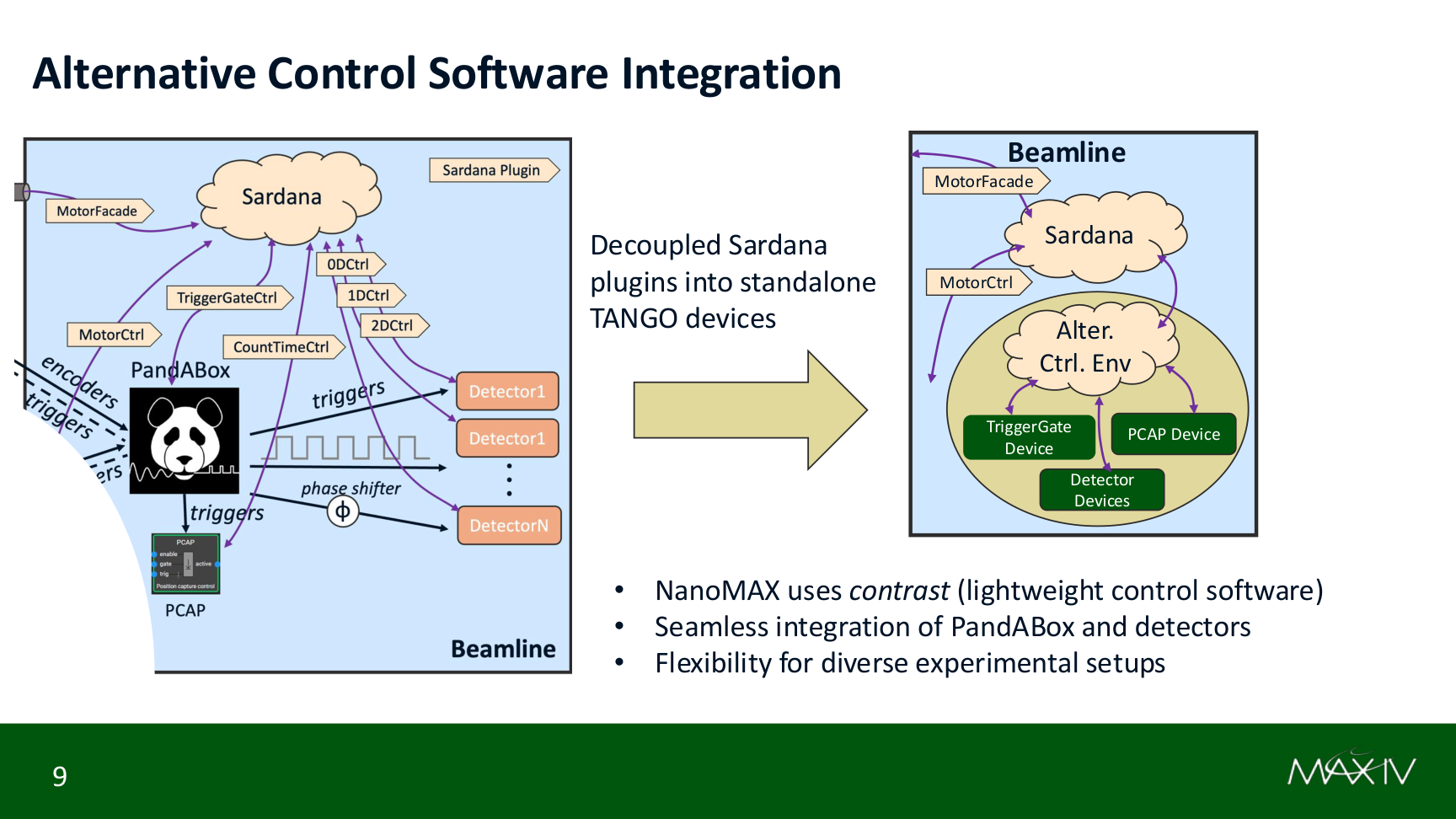
Sardana plugins can be decoupled into standalone Tango devices so other experiment control environments can reuse the same hardware integration. Source: L. Zhu et al., THAG006 talk, ICALEPCS 2025, THAG006 DOI, CC BY 4.0.
Tomography beamline operation
At ALBA’s BL31-FaXToR beamline, Sardana, Tango and Taurus form the control stack for hard X-ray micro-tomography and radiography. The published architecture keeps scan logic in Sardana macros while GUIs parameterize and execute those macros, report progress, show logs and expose safe interrupt handling.
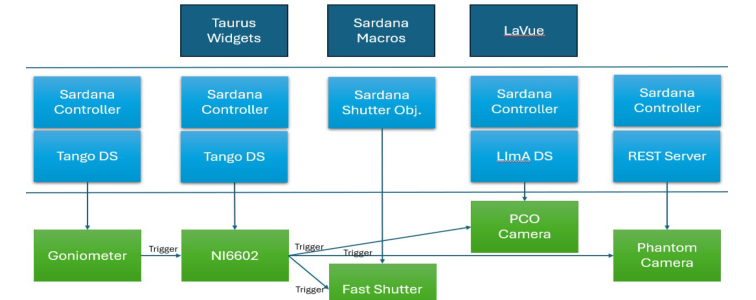
FaXToR control architecture with Taurus widgets, Sardana macros, controllers, Tango device servers, shutter, goniometer and cameras. Source: S. Wohl et al., THPD039 paper, ICALEPCS 2025, THPD039 DOI, CC BY 4.0.
Synchronization is a central part of the beamline story: the goniometer, fast shutter and 2D detector need independent timing patterns, including position- and time-domain behavior. This is the kind of experiment where Sardana’s acquisition and synchronization model becomes visible to users as reliable beamline operation rather than as framework plumbing.
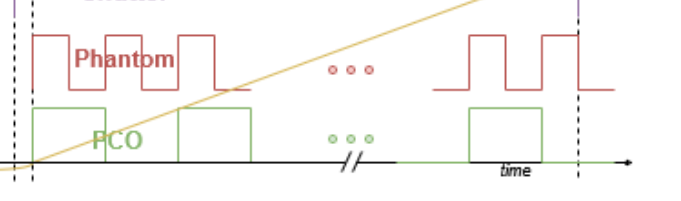
Synchronization between goniometer position, shutter opening and detector triggering. Source: S. Wohl et al., THPD039 paper, ICALEPCS 2025, THPD039 DOI, CC BY 4.0.
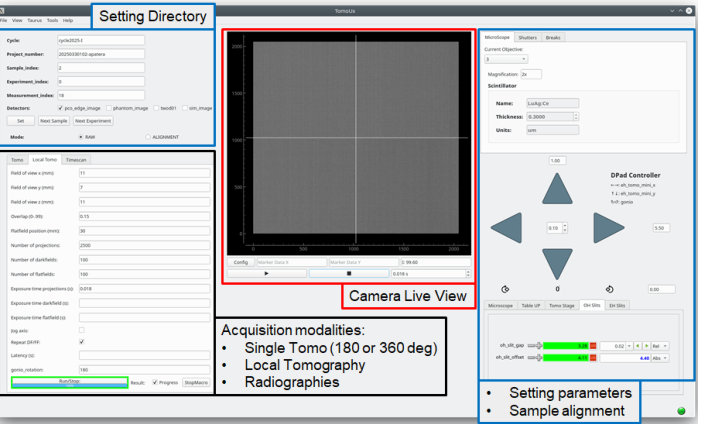
A tomography GUI built with Taurus and LaVue for acquisition setup, live imaging and experiment operation. Source: S. Wohl et al., THPD039 paper, ICALEPCS 2025, THPD039 DOI, CC BY 4.0.
From command line to beamline GUI
Sardana users do not have to choose between scripting and graphical operation. The same control model can be reached from Spock, macros, Taurus widgets, experiment configuration panels and custom beamline GUIs.
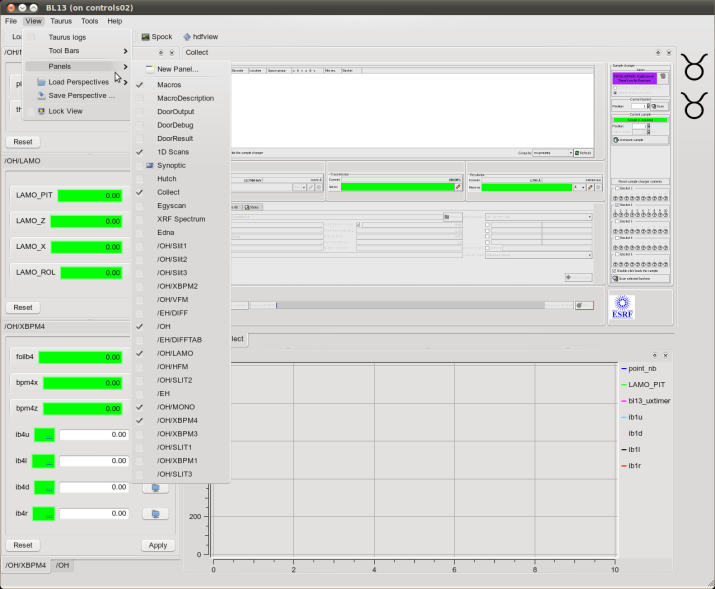
TaurusGUI at work. |
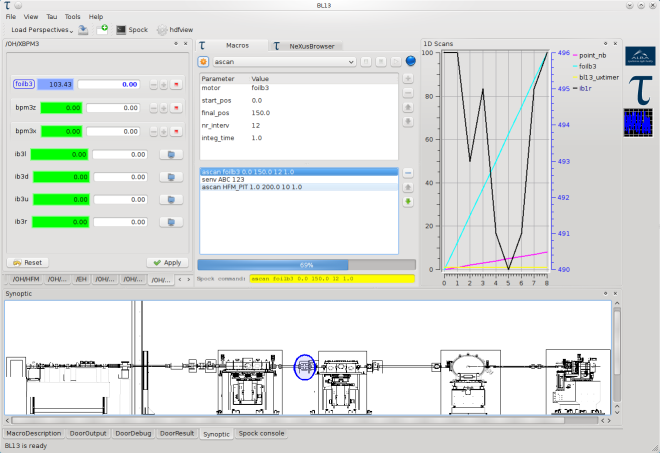
TaurusGUI with synoptic and macro widget. |
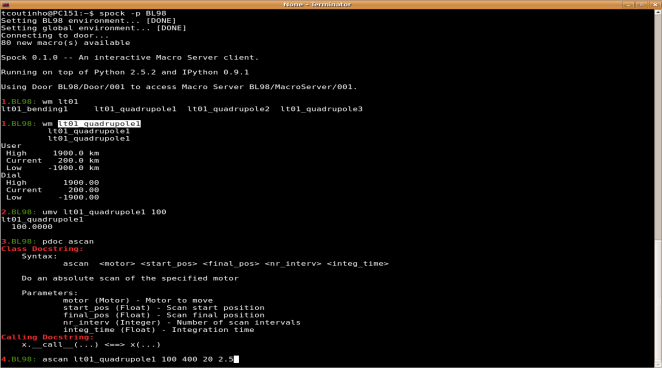
Spock console. |
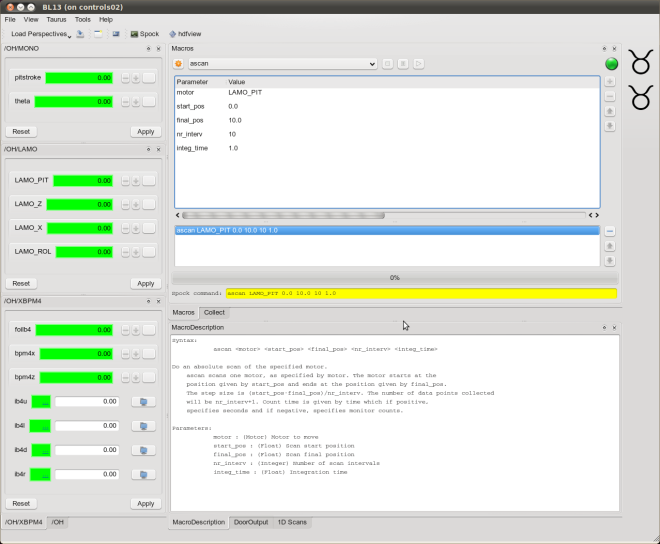
TaurusGUI with synoptic and macro panel. |
Where to go next
If you want to try Sardana from the beginning, start with Tutorials. If you already know what you need to build, use the How-to Guides guides for installation, configuration, macros, controllers, scans and tools. For the model behind the examples on this page, see the explanations of Architecture, Acquisition, Synchronization and The Macro Server.
The project is actively maintained by an international community, with regular follow-ups and workshops across Sardana-using facilities. Current development work continues in areas reflected by the examples above: continuous scans, multiple synchronization descriptions, native shutter support, trajectory support, data publication, laser-facility workflows and more approachable experiment-configuration tools.